Monday, October 30, 2006

Apple embraces microformats in new .Mac webmail

Published by Chris Messina
http://factoryjoe.com
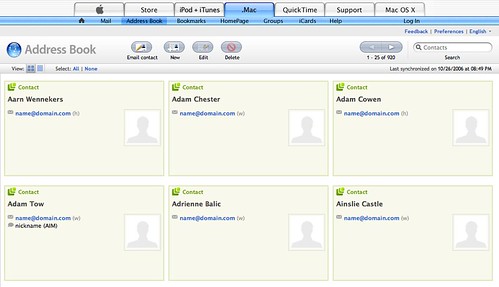


If you’ve been playing with the new .Mac webmail application, something under the surface very significant is present, but you’d probably never realize it. In fact, if it weren’t good works like Jon Hicks’ expose-mf.css browser stylesheet (view the above image without the stylesheet), you’d probably have no idea that beneath the surface, Apple was quietly giving a nod to an upstart open source community.

Given the source code that I’ve been provided, I can confirm that Apple has indeed added support for hCard in .Mac webmail, though not without a few errors (notably the ‘n’ optmization).

The significance of this can certainly be understated at this point, as few applications are built to take advantage of microformats browser-side (adding address cards that are already in your address book to your address book doesn’t make much sense) however, with Greasemonkey and other ideas like GreaseKits making the rounds (okay, so I came up with GreaseKits), we can count this as yet another feather in our cap as more and more large vendors make their web properties more semantically rich, opening up possibilities previously inaccessible given the sheer cost of maintaining one-off scrAPI techniques.

Now when you write a script to parse, augment, enhance or “user-interface-ize” microformatted content, it will work everywhere that microformats show up — not just one site at a time. With Firefox 3 looking to add support for microformats, it’s positive support by folks like Apple that will provide fertile ground for what the next generation of mashable web services looks like.

How to run Darwine on an Intel Mac

There's a lot of options for running Windows apps on an Intel Mac these days. Parallels, Boot Camp, Q, Crossover, etc... One that often gets missed is Darwine, the port of Wine to OS X. While not much runs in Darwine, and it is definitely alpha at best, it's at least something to play with if you have an Intel Mac. Plus, one of the few things that does run is the best Windows app ever: MSPaint.

So here are some instructions to get you started. Keep in mind, Darwine is very unfinished, so don't blame me or the Darwine devs if this completely destroys your system, your data, and/or opens a vortex to hell.

  1. The first thing you'll need is an Intel Mac. If you have an older PowerPC Mac, this just isn't going to work.
  2. You'll also need to install X11, which is located on the Tiger install DVD that came with your Mac.
  3. Download the latest version of Darwine here.
  4. Open the disk image you just downloaded, and copy the entire Darwine folder to Applications.
  5. Go to Applications and open the Darwine folder, then open the WineHelper application.
  6. Go to the WineHelper menu, and pick "Configure Wine". It might look frozen up for a bit, but let it do its thing. Once it loads up, you don't have to do anything except click "Save". This is where I messed up first, and if you don't do this step, it just doesn't work. Close the window after hitting "Save".
  7. Back in the Applications/Darwine folder, open the Sample WinLib Applications, and then open winemine.exe.
  8. Play some Minesweeper.
  9. If that worked, you should be able to attempt open any exe with Darwine. Keep in mind, most everything won't run, but you can at least try to open it.
  10. If you do want to run MSPaint, you'll need to copy both the mspaint.exe and mfc42u.dll files from the C:\Windows\System32\ folder on a PC to some folder on your Mac.

That's it. Useful? Probably not... unless you love MSPaint like I do.